
Case study
Hiperlink Security on 31 WordPress sites, with nothing broken.
Hiperlink Security is our free WordPress plugin. After WordPress.org approved it, we installed it on 31 sites we look after: our own website, websites of clients we maintain, and content sites and portals we run ourselves. Twenty-nine of them were done in one night, with a check after each site before moving to the next.
The plugin
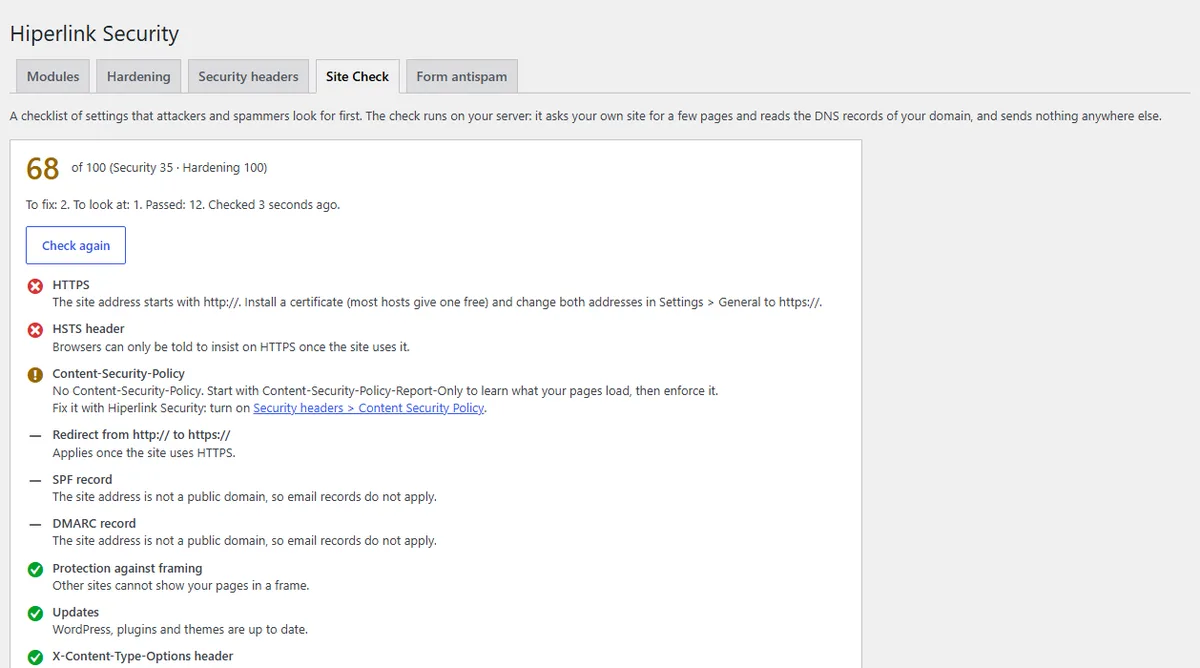
Site check, with a fix for each item.
Starting point
Thirty-one sites, each a little different.
Business websites, portals, blogs and one multisite network, with different themes, caching plugins and hosting. A fresh WordPress shows login names through author links and the REST API, answers pingbacks, prints its version in the page source and leaves readme.html in the site root. Some of the sites already hid part of that with their own code, others did not.
We do not name the sites. A list of sites and the tools they run would help an attacker more than it would help you.
What we did
One plugin, the same settings everywhere.
01
From WordPress.org, with a backup first
Every site got the plugin from the official directory, not from a zip file, so updates arrive the normal way. Before each install we saved a copy of the site’s database.
02
Hardening
Login names are hidden from author links and the REST API, pingbacks and trackbacks are off, and the WordPress version is gone from the page source and feeds. The module can also remove readme.html and license.txt, which name the version too.
03
Site check
22 checks of the settings attackers look for first: HTTPS and security headers, visible versions, login names, XML-RPC, pending updates, the PHP version, error display, a user called admin, and SPF and DMARC. The check runs on the site’s own server and sends nothing anywhere else.
04
Nothing else
During the rollout we did not change how anyone logs in, and we left the security tools the sites already had in place. Modules that change logins or send new headers stayed off; turning them on is a separate decision for each owner.
Checks
Each site checked before the next one.
- The page cache cleared, so visitors get pages built with the new settings.
- The home page and articles loaded as before. On the network of portals we compared the HTML, meta tags and headers with the copy from before the install.
- The PHP error log read after the install, looking for new lines.
- Site check run on every site, and every warning reviewed.
Results
No broken page, one false alarm.
- 31 sites, no new PHP errors: no page stopped working and nothing changed for visitors.
- Under an hour for the 29 sites done in one night, with the checks on each site included.
- Hardening score 86 to 96 out of 100 in Site check on every site where we recorded it.
- One false alarm, fixed the same day: on 17 sites Site check warned about public login names although they were hidden. Those sites send author links to the home page, and the check read the domain name in that address as a login name. Version 1.1.17 looks only at the path and was on WordPress.org the same day.
Site check also lists what a plugin cannot change, such as email records in DNS and headers the server sends. Those are fixed outside WordPress. We check every site again two days after the install and will add the result here.
Try it
Free, for any WordPress site.
The plugin is free under the GPL. Its page on our website lists every module and setting.
Services used: website security and WordPress maintenance.
Want to know what your site shows attackers?
The free check looks at your site from the outside and shows the result straight away.